Friday, July 24, 2009

Free Marketing Strategies: Social Bookmarking

I touched on social bookmarking in the past but really did not really give details about the benefits of social bookmarking and the types of things that can be done within the bookmarking community. A few sites to consider are:

  • stumbleupon.com
  • digg.com
  • del.icio.us
  • reddit.com

The premise of social bookmarking is the allowance to bookmark sites of interest on the actual bookmarking site rather than on your desktop, allowing you to access to your bookmarks from any computer. I am sure you are thinking, how would that possibly help me with marketing my business. I urge you to keep reading as it will become clear momentarily.

The added perk to being able to bookmark sites online rather than on your desktop is the added flexibility that is involved. You are able to add comments to the bookmark, leave comments/feedback for the owner of the website, submit your own sites into this pool of sites that can be bookmarked, as well as others being able to see. You can share these bookmarks/interests with family and friends.

For sites like stumbleupon, and digg, the point is to leave reviews for websites. Start at 20 reviews. Once you have reached that point start adding others as friends. Continue reviewing sites. Most typically when you review sites of others that will have a look at your site and or review your site as well. Once your network of friends is large enough you can do interesting things like request that users look at your blog, or websites, and even request that they click on adsense links. I am sure now you are wondering why someone would do that. To understand that you would first need to understand the nature of those that are regular bookmarkers. Those that are regulars on the sites are really serious about what they are doing. So, if you were to suggest such things to them they would actually follow suit. Keep in mind that courtesy states that if this is done for you, if others have such a request you should also play along.

For example: You have an instance where you update your blog, and you simply let your bookmarking friends know about the post, and while they are there you ask that they click on an adsense link or two. It is a simple yet interesting way to drive additional traffic to your site(s).

Share this post :

Friday, July 17, 2009

Internet Marketing: Tip Of The Day

For my friends that are also doing affiliate marketing, and more specifically online malls, and credit cards here are the hot deals.

Online Mall:

  1. Reservatrol
  2. iDebtAssistance.com

Credit Cards:

  1. Identity Lookout
  2. GoFreeCredit.com

I have mentioned these here because they are high converting offers. So if they are within your network or you are part of their affiliate programs, it is in your best interest to implement campaigns to market these items.

Share this post :

Tuesday, July 14, 2009

Google Page Rank: On The Move Again

It looks like Google is messing with the page rank algorithm again. I have once again noted that my page rank is changing, and not for the better. I mention this because I have been keeping my efforts constant. What efforts? The social bookmarking, blog entries, web directory entries, and the efforts to make CPC ads as relevant as possible.

Again news and blogs are buzzing to the tune of changes that Google is implementing. There is a rumor that Google will shake up how they deal with backlinks and give less relevance to less relevant backlinks. There are complaints of page ranks changing several times a day at this point. There is a webmasterworld.com post stating:

“I received a communication last night that discussed a buzz going around that Google is going to shake up how it deals with backlinks. Specifically that Google is going to give less weight to less relevant linkage. This source also heard from another direction that a big change was coming in the next few days. “

I guess for the most part there when creating backlinks we are working in a scope of relevancy so there would be no need to worry about a change such as this, but it is still worrisome.

I guess only time will tell how things will be once all the changes are implemented. If anyone has any input on this, please leave a comment.

Share this post :

Friday, July 10, 2009

Google Analytics: Internet Marketing Campaign Optimization Continued…

I wrote last about the benefits of utilizing Google Analytics (GA) in the last post and mentioned that I would drill down further into several topics of GA. The topics that I wish to cover are:

  1. Setting up the linkage between GA and your website via Google Adwords
  2. Using GA to optimize your website, if you have control over the editing and publishing of your site.
  3. Using GA reports

Setting up up GA

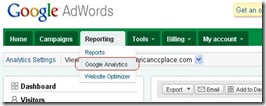
From Google Adwords you can access GA and create website profiles for your site. In the figure below you can see where to find the link to GA. It is under the reporting tab.

7-9-2009 7-45-25 PM-GA-Reporting

Once you click the GA link it will take you a page where you can create website profiles. This will be the main page by which you can look at the GA reports for each of your sites. It also shows several key metrics in a basic overview so you would be able to see what is going on at a glance. The displayed metrics are visits, average time on the site, bounce rate, completed goals, and percent change based on the timeline that you select above the table. The timeline can be either day, week, month, or year. From this page you follow “Add website profile” link.
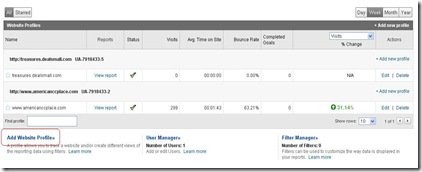
7-13-2009 7-37-52 PM-webprofileadd

Adding your site to GA is not very complicated. If you have someone managing your website then you will need to collaborate with that person to add the analytics code to your site. If you have control of your own website, then the directions that GA provides is pretty straightforward. Once you click the “Add website profile” link it will take you to the following page shown in the figure below.
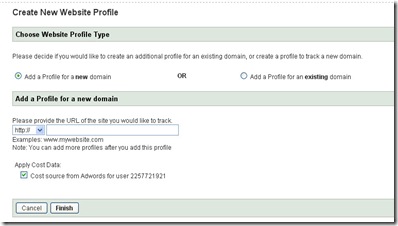
7-13-2009 7-45-08 PMprofileaddpage

The default selection to create a profile for a new domain should be sufficient. In the section that is titled “Add a Profile for a new domain”, enter your website URL. The default selection to apply cost data is also acceptable. Once you have entered in all of the appropriate information click the “Finish” button. Once the finish button has been clicked it will take you to the tracking code page. This tracking code must be added to the body of the webpage you entered for the profile. What does that mean? It means that either you or the administrator of your webpage must add the tracking code to the webpage body tag. Literally it means adding it between the <body>[tracking code goes here]</body> tags. More specifically the instructions say just before the body closing tag which is the tag that looks like this: </body>.

7-13-2009 10-50-22 PMtracking

Cut and paste this tracking code into your page, as well as save it somewhere else in a text file in case you need it again later. Click the finish button at the bottom of this page. Once you have done so the GA configuration will be complete. You will be taken back to the overview page. Once your tracking code is placed into your webpage, it will take a day or so for the tracking to take affect. This is the beginning of the optimization.

Using GA to optimize your website

Once GA has been properly configured and you have allowed several days of data collection you can go in and analyze the performance of your website. The power of GA is in being able to track various goals conversions. For instance if you have a ecommerce website, and all checkouts end on a thank you page for example. That would be one of your goals to track. From the looks of it, you are able to create four goals. Configuring these goals allows you to really be able to see where your conversions are and which keywords or ads need optimization. The video (a long video) that I mentioned before really does talk about how to get to the traffic sources area of GA. There is another video on finding the best keywords using GA This last video shows what you are able to do once you have goals defined. However they do not go into any detail when it comes to setting up those goals.

The Google Analytics help center is also a good place to go and look for information. One of the topics was setting up goals. From the dashboard view of your GA website profile you must click the “Goals” link that is in the left frame of the dashboard page, as shown in the figure.

7-15-2009 11-11-22 AM-goals From this page you must click the “Set up Goals and Tunnels” link. We are interested in setting up goals here. Once you have clicked that link it will take you to the profile settings of the website profile. In the “Conversion Goals and Funnel” area of the profile settings page you need to click the “Edit” link to get started adding a goal.

7-15-2009 5-49-18 PM-profilegoals

From there it will take you to the goal settings page. You have the choice of setting a goal that is matched by the URL head, an exact URL match, or a regular expression match. The head match allows you to have dynamic session identifiers in the URL. Exact match requires the client URL to exactly match that of the reports, thus no dynamic session information can be included. Regular expression matching are just that. The next thing that must be entered is the goal URL. When this goal page is reached it will constitute a conversion. You can name the goal, decide on whether or not the URL is case sensitive, and enter a goal value. The goal value would be the cost of the product, the commission paid on the lead, application, or sale.

You will also notice that you can also define funnels for each goal. A funnel is a serious of pages required to reach the goal page. This is especially useful in figuring out where customers leave the goal path. By that I mean you can find out what page turns customers off, or cause them to be disinterested in the offer.

Once the goal has been entered, and you have saved it, you are done. From this point forward your goal tracking will begin. If you go back to the GA dashboard, and once again click the Goals link it shows a lot of information. It tracks, total conversions, conversion rate, goal verification, reverse goal path, goal value, and goal abandoned funnels. Funnel visualization allows you to see graphs of various funnel metrics.

Using GA Reports

GA Reports are great for optimization. With your site equipped with analytics tracking code, as well as goals, you can really drill down to see how everything about your website is performing. You should be able to analyze and optimize the following aspects of your website and campaigns:

  1. Keyword performance
  2. Ad Performance
  3. Goals and goal performance
  4. Goal Funnels
  5. Conversion rates
  6. Total Conversions
  7. Bounce rates (and the reasons for them)
  8. Regional Traffic via traffic sources
  9. and more…

Look at my previous post for more information (Current Events – Ad Campaign Optimization) . Traffic sources is the best place to start when it comes to using the reports to optimize your marketing efforts. In each of the tracking areas that I mentioned in the last post you will notice that there is a “Goal Conversions” tab on the report. You can see the performance of each of your goals from this tab.
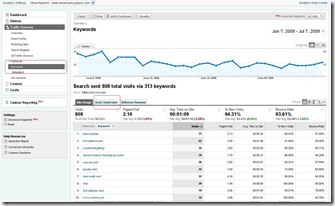
7-9-2009 7-17-24 PM-analytics

  1. If keywords of your ads are underperforming you can pause them, alter them, or delete them to streamline sets of keywords for your ad. If you are certain that a set of keywords are doing well, then you can try creating a new ad group with the same keywords, but a different ad body.
  2. If you note that a specific goal, typically tied to your ads, is not performing you can use the goal funnel to see where along the goal process a customer is being turned off. There are a few solutions to this problem. It could be the ad, keywords, or the presentation of the webpage itself. Each of these can be altered if you are in control of your whole marketing solution.
  3. If you have high bounce rates, you can do many of the same things that I just mentioned for goals. In fact you can use the goals/funnels to see where the problem is if it is indeed the website.

So basically analytics allows for the streamlining of all marketing efforts.

Share this post :

Tuesday, July 7, 2009

Current Events – Ad Campaign Optimization

As I have been working on my affiliate/internet marketing business I have learned that there is no shortage of work to be done. SEO optimization has really taken the largest part of my efforts lately.

In order to continue to be effective in this business it helps to balance out the work being done. One cannot neglect paying close attention to the cost-per-click campaigns and their optimization. All of the SEO work in the world is meaningless if you have not optimized both the CPC campaigns, as well as the website itself.

In collaborating with others on proper ad form and keyword choice the need for experimenting with different variations of the same ad has become apparent. Sometimes it is hard to explain why a particular ad would attract more attention than another, but it is worthwhile to keep trying different variations until you achieve high click through rates for each ad.

I think you will understand what I mean, or at least also be able to join in on the question as to why this small difference would cause such a drastic increase in click through rate. Here is an example:

Total Visa Credit Card

Apply Now for a Total Visa Card

Instant Decision. Bad Credit Ok

www.americanccplace.com


Total Visa Credit Card

Apply Now for a Total Visa Card

Instant Decisions. Bad Credit Ok

www.americanccplace.com

When experimenting with ad variations and keywords alike it is important to keep in mind the proper length of the test. When working on optimization it makes sense to try variations out for a week at the very least. That literally means once you have decided on a variation and published it to your campaign, you should not alter or tweak it for a week at a minimum. With that in mind the first ad variation yielded a 7.63% click through rate over a weeks time. Some days during that week were as high as 33%, and other days were as low as 2%. The the second variation yielded a fraction of a percent over the same week. Another important note is that the two ads were done as completely different ad groups rather than variations on the same ad group. If you do variations within the same ad group, you do get to see which one performs better due to the fact that Google/Yahoo/MSN will give more exposure to the better performing ad, but since they compete for exposure the click through rates that you see will not fully reflect standalone ad performance.

Google Analytics is full of great tools that can help with ad group/keyword performance. I will briefly go over what I have been doing with Google Analytics, and actually drill down into the topic in the next blog post.

I originally spoke about Google Analytics in an earlier post titled Tools and Tips – For your PPC Campaigns. There I listed and briefly explained all of the various metrics that Google Analytics displays and reports on. Here I will show how to get at the various screens. First I will state that there is a great set of YouTube videos that talk directly to the point of using analytics to monitor your site, PPC ads, and keyword performance.

There are a couple of setups that I mentioned before when it comes to analytics. There is the case where you have full control over your marketing, meaning you have control of your website as well as your PPC/PPM ad campaigns, and the case where your site is managed by a team of designers who maintain and update the site on a consistent basis, leaving the affiliate only needing to worry about driving traffic to the site. I am operating within the boundaries of the latter case. There are merits to doing it this way, especially when there are a large number of offers on the website, legalities, as well as new offer updates, expirations, amendments and the like. So I will first talk about my case. I will add the second case in the next post.

Google Analytics(GA) is tightly bound to Google Adwords. You actually access GA through your Adwords account. The area of the GA that I will be focusing on is “Traffic Sources”. I am of course assuming that you already set your website up with Google Analytics. I will place a walkthrough in the next post. You have to go to the “Reporting” tab in your Adwords account in order to get to GA.

7-9-2009 7-45-25 PM-GA-Reporting

When you log into Google Analytics the first page that you come to is the dashboard. From the dashboard you select view report on the website profile that you wish to analyze. Once there look for the traffic sources link on the upper left frame of the page.

7-9-2009 7-17-24 PM-analytics 

That will take you to a traffic sources overview. From there you can see that there are quite a few things that you can do here. I will be looking at “Ad versions”, and “Keywords” here. Obviously at first glance looking at the keywords in the picture, it is time to optimize them. The metric that I have been paying attention to is the bounce rate. Bounce rates of higher than 40-50% really need to be reworked. Ideally having bounce rates of 40% or less would be best. So as you can see in the picture above I have selected “Keywords” in the traffic sources menu (circled in red). I am in the process of reworking the keywords shown in the report above, along with trying different ad bodies as well. For keywords or I should say a keyword tool, I would say use the one that comes with Adwords, or an external tool such as keywordspy.com. The basic truth is to stay away from the words that have high cost per click, and focus on those that are not so popular but still attract ample attention to your ads and site. There is yet another tool offered by Google called the Search Based Keyword Tool still beta but highly useful. I found it while going through the Google Analytics Blog. I would recommend having a look there since it really does do a great job of showing you keywords that are relevant to your site. It too is bound to Adwords so the site that you are targeting with your ads will appear in the tool. What the tool does is give you either all relevant keywords across your entire website, or a specific set of keywords if you enter in keywords for the search. What is really cool about this tool is that it gives your the keywords for each page of your website, thus you can be highly specific in your ads. FANTASTIC!!!

The other item that I mentioned was the “Ad Versions” traffic source. Here you can see your ads, and how each of them is performing. Again I was looking at bounce rate for each ad so that I know which ones to optimize by trying different ad body or keywords.

7-9-2009 9-53-19 PM-adversion

The overall campaign bounce rate average is actually not so bad, but if you look at the individual ads you can see that there are some issues. What I see first is that there are several ads that are underperforming, while others have a high bounce rate. So looking here I could look at the keywords for a each specific ad and work on those, and/or try different ad bodies for those that are not receiving many clicks.

This is a quick way to see how ads and keywords are performing allowing us to maximize ROI by showing us where the trouble spots are in the campaigns.

Share this post :

Friday, July 3, 2009

Blogging Continued...

Continuing on my thoughts about blogging, and a blogs usage when it comes to marketing…

I wrote briefly on the merits of leaving comments on other blogs, responding to feedback, bookmarking sites, leaving testimonials, and the like.

There are benefits here:

  1. Being active, reading blogs helps us learn more about what we ourselves are focused on.
  2. Leaving comments that reflect your appreciation for another’s input into their blog, or article, is not only courteous but will also attract attention to you and your blog, by the owner of the blog in some cases, and also others that read comments
  3. Responding to feedback left on your blog shows that you are active and present with your blog. It also personalizes the blog. This would definitely help with return readers.
  4. Participating in bookmarking sites such as digg, stumbleupon, and de-li-cioius attract people to your blog because it also becomes one of the sites that people can reach through these networks. It is a mutual publicity forum for sure. The sites are basically a personalized rating system, allowing your site(s) to have wide exposure to relevant traffic.

Reference:

__________________________________________________________

StumbleUpon @ Wikipedia

Share this post :